
Notifications
Clear all

Topic starter
11/03/2025 10:49 am
I just started learning Blender and was desperately searching for a good keyboard shortcuts reference. Found this really clean cheat sheet that seems perfect for beginners like me.
I know there are some popular ones out there (like the Giudansky ones from https://markoze.com/tutorial/blender/blender-keyboard-shortcuts-or-cheatsheet), but they felt too overwhelming for complete beginners.
This one is much simpler and actually print-friendly:
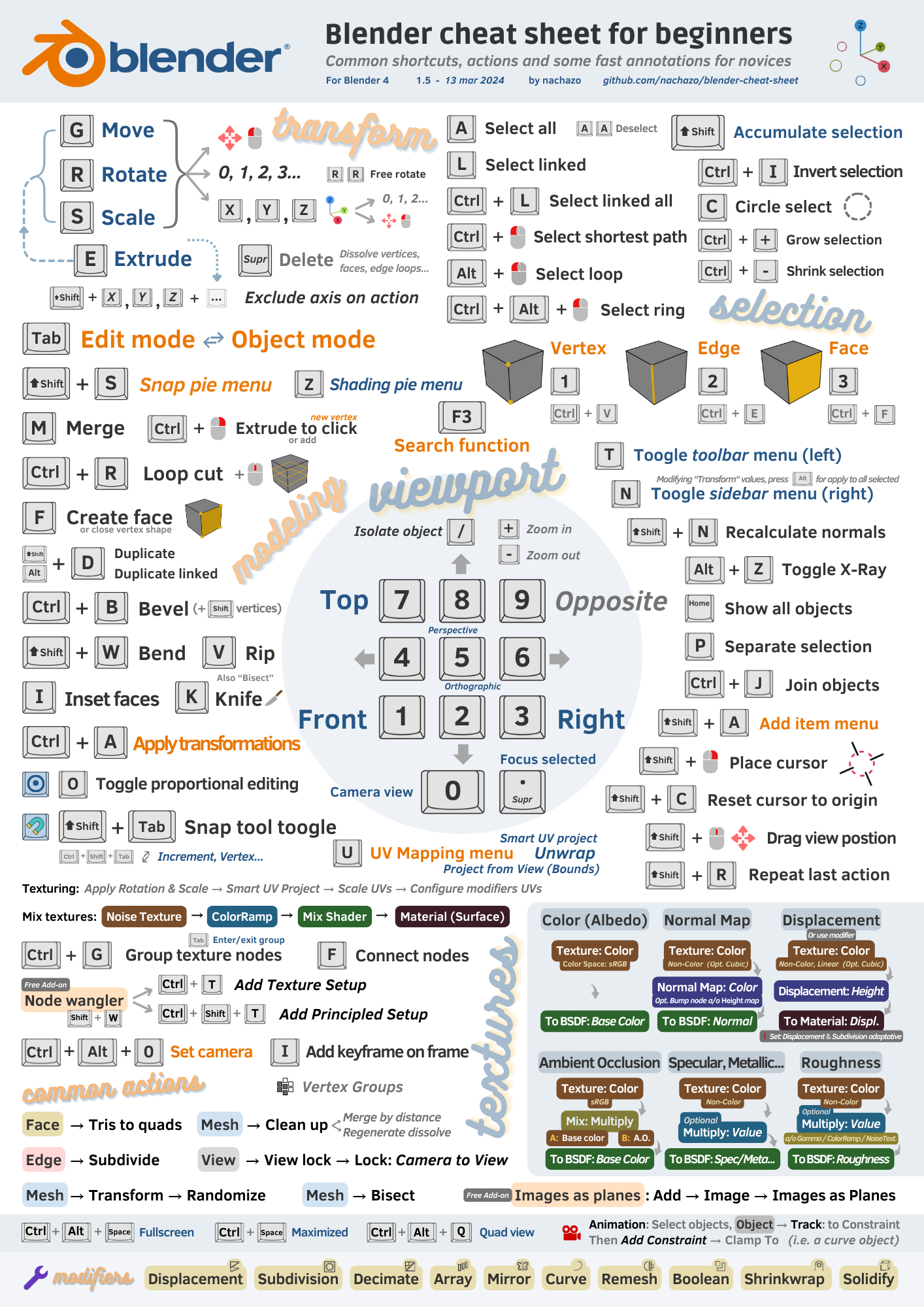
Has anyone else used this? Seems like it was made by someone who was also learning and only included the essential shortcuts.

12/03/2025 3:11 pm
WOW this is super impressive!!!
I've been looking for something exactly like this. Most cheat sheets are way too cluttered with advanced shortcuts I won't need for months. The layout is so clean and actually makes sense visually.
This is perfect timing as I was feeling completely lost with all the shortcuts. Thanks for sharing!

14/03/2025 11:39 am
Much appreciated. Especially that it's simple enough for a beginner not to have their head explode 🙂
Looks like the creator has a GitHub repository so they might be updating it as they learn more. Worth keeping an eye on.

17/03/2025 11:49 am
Anyone else constantly hitting Spacebar expecting it to play/pause like in every other software ever? Just me? OK... 😅

19/03/2025 8:47 am
Where was this two months ago when I started?! I literally had sticky notes all over my monitor trying to remember these shortcuts.
Some additions that helped me as a beginner:
- Alt+Z to toggle X-ray mode (see through objects)
- Shift+D vs Alt+D (different types of duplicating)
- `.` key on numpad to focus on selected object
But otherwise this is so much cleaner than other resources I've found. Bookmarked!

24/03/2025 5:09 pm
oh i'm trying to model cars for a Roblox game, but first i'm watching Ryan King Art's tutorial series, and this cheat sheet helps me remember shortcuts

26/03/2025 2:41 pm
I found another page from the same creator that has more advanced shortcuts:

Looks like they're adding more as they learn. Definitely a resource worth keeping an eye on!
Kevinfaita reacted

01/04/2025 8:28 am
I love this cheatsheet and how it's designed - very intuitive. Whoever made this has an incredible ability to synthesize lots of data in an easy way to understand!

03/04/2025 11:18 am
Just printed this out and it's already covered in coffee stains. Which I guess means it's being used! 👍

14/04/2025 8:28 am
Does anyone know who actually made this? Would love to follow their other work if they have more beginner resources.